Tampilkan postingan dengan label CompAccessories. Tampilkan semua postingan

Senin, 21 November 2011

Sharp LC60LE6300U 60-inch 1080p 120 Hz LED HDTV

Sharp LC60LE6300U 60-inch

Great for the price

I bought this TV for a good price from HHGreg for $999 and here are my views .

Picture Quality: I would give it 3 stars as this TV lacked the crispness i was looking for that my other LG 42 inch had.All sports channels however looked great.

With that being said i have seen reviews of other sharp models that required manual caliberation for an enhanced picture clarity. i have yet to do that.

Sound quality : Decent but do not expect a home theater effect.

Setup feature : I would give a 5 star with the ease i could set the TV up from the box and a very simplified process.

All in All it's good bang for your buck , however if you were to compare it with a Samsung or an LG then be prepared to pay the price for it.

Update : After changing the settings as sugessted by the folks at amazon (which is as below) , the clarity and cripness has greatly improved and is on par with a bravia or a samsung. I have changed my review to a 4 star.

-------------------------------------------------------
Under PICTURE SETTINGS: AV MODE: USER
OPC: OFF
BACKLIGHT: 0 (STANDARD)
CONTRAST: +28
BRIGHTNESS: 0
COLOR: -4
TINT: +4
SHARPNESS: +1
Under PICTURE SETTINGS ADVANCED
COLOR TEMP: MIDDLE
MOTION ENHANCEMENT: OFF
ACTIVE CONTRAST: ON
GAMMA ADJUSTMENT: +2
FILM MODE: STANDARD
DIGITAL NOISE REDUCTION: OFF
---------------------------------------------------

I yet have to buy a blue ray player to see the clarity of the video from the blue ray player as the DVD player i have does not have an HDMI uplink convertor which gives me an ok picture quality with the RGB cables.

I would also give a 5 star for the looks as it looks super sleek and would look bad ass mounted on the wall. :-)

By
Srini

Product Description

The AQUOS LC-60LE6300U 60-inch class (60-1/32-inch Diagonal) is a high-performance large screen LCD TV. The Sharp Full HD 1080p X-Gen Panel produces a breathtaking picture quality. The LC-60LE6300U has built-in ATSC/QAM/NTSC tuners and 3 HDMI inputs, compatible with 1080p signals. It features a sleek piano-black cabinet and subtle and recessed bottom-mounted speakers. 20% more screen area than a 55-inch classThe proprietary AQUOS LED system comprised of the X-Gen LCD panel and UltraBrilliant LED enables an incredible dynamic contrast ratio of up to 4,000,000:1 and for excellent picture quality. 120Hz Fine Motion Enhanced virtually eliminates blur and motion artifacts in fast-moving video. 60-inch class: 20% More Screen Area Than a 55-inch class Full HD 1080p X-Gen LCD PanelSharp's X-Gen panel provides a wider aperture allowing more light to pass through, which requires fewer backlighting elements to create an extremely bright image. Also, because the re-designed LCD panel has less ribs than traditional panels, the pixels are better sealed which enables nearly all light to be blocked resulting in darker images. 3 HDMI Inputs Three HDMI ports are available for convenient connection to digital devices, such as Blu-ray players, next-generation consoles, and more.

Product Features and Technical Details

Product Features

  • 60" LED Big Screen TV
  • LED Backlighting
  • 120Hz
  • X-Gen Panel
  • 3 HDMI inputs

Technical Details

  • Brand Name: Sharp
  • Model: LC60LE6300U
  • Display Technology: LCD
  • Display Size: 60 inches
  • Image Aspect Ratio: 16:09
  • Image Contrast Ratio: 4,000,000-1
  • Resolution: 1080p
  • Refresh Rate: 120


BuyNow


Senin, 14 November 2011

Cisco-Linksys E4200 Maximum Performance

Cisco Linksys E4200

In order to achieve the best possible speed from your router, you generally need a top-end adapter with a 3x3 antenna configuration, such as Intel’s Ultimate-N WiFi Link 5300 or Ultimate-N 6300. That hasn’t changed with the Cisco Linksys E4200 cable router, but what is new is its maximum theoretical throughput: it’s the first router we’ve come across rated at 450Mbits/sec; most other high-end dual-band models top out at a theoretical 300Mbits/sec.

As with all routers, the real-world speeds you can achieve, even in ideal conditions, differ vastly from these headline speeds. And note: 450Mbits/sec is achievable only over 5GHz; 2.4GHz devices connect at the slower 300Mbits/sec.

There’s no denying it’s a quick router, though. Over 5GHz we achieved average throughput of 161.1Mbits/sec transmitting large files from our test laptop to a laptop hooked up to one of the E4200’s four Gigabit Ethernet ports. That’s around 14Mbits/sec faster than the fastest router we’ve previously seen in this test, the D-Link DIR 855.

In other tests at close range, the E4200 is less consistent than the D-Link, though. Speeds dropped to 95Mbits/sec when receiving the same files, and to 96Mbits/sec and 80Mbits/sec when transmitting and receiving 1GB of smaller, 1MB files. Over 2.4GHz it’s slower still, achieving large-file transmit and receive speeds of 94.2Mbits/sec and 72.2Mbits/sec, and small-file transmit and receive speeds of 58.5Mbits/sec and 66.8Mbits/sec.


What’s most notable about the E4200, however, isn’t its performance at close range, but its speed at long distance. Where most other routers slow dramatically or completely fail to connect consistently over 5GHz in our long-range test (this involves moving the laptop 40m away from the router, with a wood wall and double glazed window in the way), the E4200 put in a sterling performance.

Despite lacking external antennae (there are six inside, three each for 2.4GHz and 5GHz), we measured transmit and receive rates for large files of 51.5Mbits/sec and 50.7Mbits/sec, and 37.7Mbits/sec and 51.4Mbits/sec for small files. For comparison, the D-Link DIR-855 failed to complete this test over 5GHz; only the Belkin Double N+ is faster at long range over 5GHz. We can only imagine what the performance would be if only Cisco would forego the internal antenna design.

Elsewhere, however, the E4200 isn’t quite as impressive. Long-range performance over 2.4GHz is below average, and features aren’t stellar either. You get four Gigabit Ethernet ports and concurrent 2.4GHz and 5GHz networks, as you’d expect, but there’s little else to justify the high price tag. A single USB port enables NAS features, but speeds are slow at 5.4MB/sec for large file transfers and 5MB/sec for small files. There’s nothing unusual in the web settings pages either. You can set up a guest network, and there are basic parental controls, but there’s no sign of proper hardware VPN, VoIP or support for 3G dongles or printers.

At £169 though, notwithstanding the excellent all-round performance, we’d expect rather more than this. The Cisco Linksys E4200 may be cutting edge, but there are very few adapters that allow you to take full advantage of its 450Mbits/sec speed, and without a more rounded feature set it’s hard to recommend.

Verdict

Fast, particularly over 5GHz, but a little light on features for such an expensive router


Author: Jonathan Bray


BuyNow


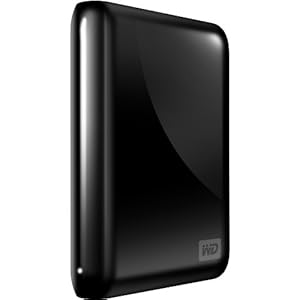
Western Digital My Passport Essential SE 1 TB USB 3.0/2.0 Ultra Portable External Hard Drive (Black)

Western Digital My Passport Essential SE 1 TB

What good is an external drive for backups if there isn't any good backup software to go along with it? Western Digital's My Passport Essential SE comes with a bevy of utilities to help users more easily protect their important files, photos, and videos. You also get a full terrabyte of storage for 1GB, but the speed and design of this $109 drive give us pause.

Design

One of the lighter drives around, the Western Digital My Passport Essential weighs just 7.2 ounces, half the weight of the Iomega eGo Portable Hard Drive. Still, the Passport's plastic case felt very flimsy, flexing when we pressed on it. The even-lighter LaCie Rikiki (7.1 ounces) has a tougher aluminum case.

Software

The best aspect of the My Passport Essential is its included software. The clean and intuitive installer walked us through the setup quickly. The program prompted us to perform an initial backup and to add a password to protect the drive, steps not offered on any of the other drives we tested.

During backup, the software provides a visual indicator of the status by way of gauges. As the backup finishes documents or media files, you see a box that fills up. Restoring files was also just as easy using the Western Digital software. You can quickly select whether to restore files to their original location or to a new folder.

Western Digital also includes encryption software to protect the drive and password-protect files. There's even a way to check drive diagnostics and set a timer as low as 10 minutes for when the drive goes to sleep. And, as a bonus, all the apps are bundled together so the software is easier to uninstall. Buffalo Technology includes more advanced software with its drive, but Western Digital comes in a close second.

Performance

Unfortunately, all the software in the world can't make up for slow transfer speeds. It took the My Passport Essential 1 minute 43 seconds to transfer a 5GB folder of documents and media files, a rate of 49.7 MBps, the slowest of the 1TB drives we tested. The fastest drive, the Buffalo MiniStation Stealth, wrote the files at a rate of 64 MBps--23 seconds faster.

When copying the same 5GB folder off the My Passport Essential, the drive fared a little better, taking 1 minute and 50 seconds, a rate of 46.5 MBps. That's good enough to beat out the LaCie Rikiki (36.6 MBps) and the Buffalo MiniStation (44.5 MBps), but it's still far below the Seagate GoFlex (71.1 MBps).

Verdict

Western Digital includes some excellent utilities with its My Passport Essential external hard drive. That said, its poor transfer times and flimsy case make the $109 asking price hard to stomach. For $15 more, the Iomega eGo offers better speeds, and is rated to survive 7-foot drops, and if you're looking to save some money, the $99 Seagate FreeAgent GoFlex couples a sweet set of software with better performance.

BuyNow


Canon PIXMA MG5320 Wireless Inkjet Photo

This 3-in-1 device features built-in wireless printing, a 3.0-inch LCD on its top control panel, two-way paper feeding, a five-ink system, and Full HD Movie Print.

In our hands-on first look of the MG5320 we'll focus on its build and design, specifications, pricing, and availability. Be sure to keep an eye out for our full review to get a better idea if it's the right AIO photo device for your home.

CANON PIXMA MG5320 SPECIFICATIONS:

  • 3-in-1 device: print, copy, scan
  • Print speeds: 12.5 ipm in black, 9.3 ipm in color
  • 4x6 print speeds: approx. 20 seconds
  • Print resolution: up to 9600 x 2400 dpi
  • Paper capacity: 150 sheets; 150 sheets cassette
  • Max. document size: 8.5" x 11.7"
  • Auto duplex
  • MS Duo, SD/MS, HighSpeed USB 2.0
  • Full HD Movie Print
  • Connectivity: USB 2.0 and Wi-Fi LAN
  • Energy Star compliant
  • 1-year limited warranty and InstantExchange program

The MG5320 has many features that complement its quality photo printing. Some include a high maximum resolution of 9600 x 2400 dpi, the Pixma CloudLink software, PictBridge, Full HD Movie Print, and CD/DVD printing. Users will also have access to a slew of photo software templates, such as calendars, albums, stationery, memos, and many more.

BUILD AND DESIGN

The Canon PIXMA MG5320 has a glossy black exterior with silver accents on the Canon and Pixma logos, as well as a silver bar that separates the scanner from the rest of the device. The all-around glossy design adds a nice stylish look to this photo AIO, but it will also attract dust and fingerprints easily. This generation features the control panel on the center of the lid instead of on the right side and a bigger LCD screen at 3.0-inches instead of 2.4-inches. The device is also slightly smaller than the MG5220, at 14.5" (W) x 17.8" (D) x 6.6" (H) and 18 lbs.

Layered from the top of the device down, first comes the 48-bit flatbed scanner. The scanner offers a maximum optical resolution of 2400 x 4800 dpi, auto document fix, auto scan mode, gutter shadow correction, push scan, scan to memory, wireless scanning, and can fit up to a 8.5 x 11.7-inch sized document.

The control panel is located on the center of the lid and features an adjustable 3.0-inch color LCD, a scroll wheel for simple navigation, a home key, and a Wi-Fi LED indicator. The control panel is sprawled out across almost the entire bottom half of the lid, under the Pixma logo.

The paper feed tray folds out from the bottom and can fit a variety of paper sizes, including 4 x 6, 5 x 7, 8 x 10-inch, legal, letter, and U.S. #10 envelopes. The supported media types include plain paper, high resolution, super high gloss: photo paper pro platinum, photo paper plus glossy II, regular glossy, photo paper plus semi-gloss, matte photo paper, and U.S. #10 envelopes. The feed tray can fit 150 sheets and the cassette also fits an additional 150 sheets. The cassette is pictured below on the right side.

The media card readers are located to the front-right of the device. Open the door flap and you will find a MS Duo and SD/MS slot, compatible with tons of storage devices, including SD, SDHC, MultiMediaCard MultiMediaCard Plus, miniSD Card, miniSDHC Card, microSD Card, microSDHC Card, RS-MMC, Memory Stick, Memory Stick PRO, Memory Stick Duo, Memory Stick PRO Duo, and Memory Stick Micro. Directly below that is the USB flash memory and PictBridge slot.

Lift underneath the flatbed scanner to find the ink cartridge holder for the 5-toner system. The MG5320 comes shipped with four dye based inks--CLI-226 Cyan, Magenta, Yellow, and Black--as well as one pigment based black ink tank, the PGI-225.

The connections can be found in the back of the device, including the power and the USB cable slot. Hand grips for carrying it are located on the bottom of both sides.


Design by Free WordPress Themes | Bloggerized by Lasantha - Premium Blogger Themes | cheap international calls